GeneratePress vs. Kadence in 2026
We build client sites with both of these systems, and that changed what we think is worth comparing. Feature checklists and blank-demo speed tests have predicted little about how our projects went. Who edits the site after launch, what the content model needs to do, and how much platform risk a business can accept shape nearly every recommendation we make.
Both are good choices. The reasons differ, and the differences are worth being specific about.
The Short Answer
Choose Kadence when a content team needs a shorter editorial handoff, flexible visual controls, and WooCommerce-specific layout tools. Choose GeneratePress with GenerateBlocks when a site needs a custom content model, reusable dynamic layouts, and a development team that expects to extend the system over time.
Both can produce fast, accessible sites. The choice comes down to who will maintain the site, what the content needs to do, and how much custom functionality the business expects to add later.
Two Stacks, Not Two Themes
Most comparisons treat each side as a single theme. Each is a stack of parts, and knowing which part does which job matters more than any overall verdict.
| Layer | GeneratePress ecosystem | Kadence ecosystem |
|---|---|---|
| Theme | GeneratePress | Kadence Theme |
| Block-building system | GenerateBlocks | Kadence Blocks |
| Site-wide conditional templates | GeneratePress Elements | Kadence Elements |
| Dynamic listings | Query, Looper, Loop Item, Dynamic Tags | Dynamic Content, Advanced Query Loop, Query Cards |
| WooCommerce layer | WooCommerce with custom templates and dynamic layouts | WooCommerce with Kadence Theme controls and Shop Kit |
GenerateBlocks has grown beyond its original small set of layout blocks. Its current Query system separates the query from the repeated layout, supports pagination and no-results states, and can use dynamic data from posts, authors, and custom fields in block output.
Who Publishes After Launch
In our projects, Kadence has been the shorter handoff for content teams. More of its controls are visible in the editor, so a person updating a page can find the setting without learning a component system first.
The conditional menus in the Guerra Insurance Agency build are a good example. The site serves English and Spanish readers, and Kadence let us show each visitor navigation matching their language from theme settings rather than custom code. That is the kind of requirement a content team inherits, and it stayed configurable after we handed the site off.
GenerateBlocks asks more of the person building. It rewards someone comfortable thinking in queries, reusable patterns, and structured content, and it can feel sparse to an editor expecting visual controls for everything. The payoff comes when the site needs to do something the visual controls do not cover, which is the next section.
Can the Site Grow Beyond Standard Pages?
Both systems handle dynamic content. The difference is working style, and this is where building with both taught us the most.
At Firefly Therapy Austin, each therapist profile can show that clinician’s own writing. We built a paginated Posts by This Therapist loop with GenerateBlocks’ native Query system, resolving each profile to the posts that therapist authored, then added a reusable call to action beneath blog posts that routes readers to the appropriate Get Started or Contact page. The loop replaced a third-party display plugin the site had been carrying. We did not need an additional display plugin for either feature, and both live in the same block system as the rest of the site, so extending them is ordinary site work.
Kadence could have built a version of this. Its Advanced Query Loop and Elements cover similar ground, and its Dynamic Content settings are easier for an editor to discover. The distinction we see in practice: GenerateBlocks treats a content relationship as a building block you compose and reuse, which suits sites that will keep growing new relationships. Kadence gets a content team to a configured result faster.
How Central Is WooCommerce?
For Research to Real World, a resource hub for the Juniper Gardens Children’s Project, the store needed product page layouts a research team could keep publishing into. We used Kadence with Shop Kit for product-page presentation and paired it with structured product types built through query loops. That is why we often start with Kadence for WooCommerce stores where the team needs to control product-page presentation without depending on a developer for every layout change.
| Store situation | Where we would start | Why |
|---|---|---|
| A content team needs control of product layouts and galleries | Kadence with Shop Kit | The store-specific visual controls already exist |
| Products connect to profiles, resources, or unusual archives | GeneratePress with GenerateBlocks | The query system builds custom relationships from structured data |
| Commerce is secondary to lead generation or editorial content | Either | Choose on who maintains the site, not the store features |
We would not call either side categorically better for WooCommerce. Kadence is often the more efficient starting point when design control matters most. GenerateBlocks is the more extensible one when the catalog is part of a larger content system.
What the Performance Question Misses
Every comparison publishes speed claims. Here is ours, with the caveat that makes it honest. These are production client sites with real fonts, forms, analytics, and in one case WooCommerce. The block system contributed to the result, but it did not determine it on its own. Image handling, font loading, third-party scripts, template choices, hosting, and caching matter at least as much.
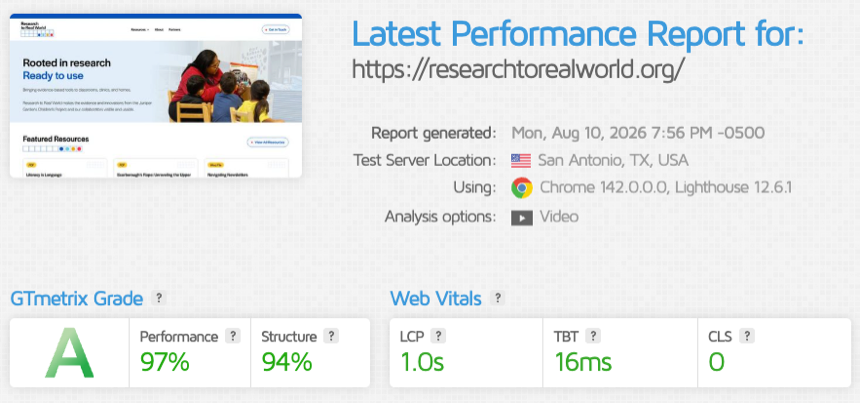
Research to Real World, built with Kadence and WooCommerce: 97 performance, LCP 1.0s.
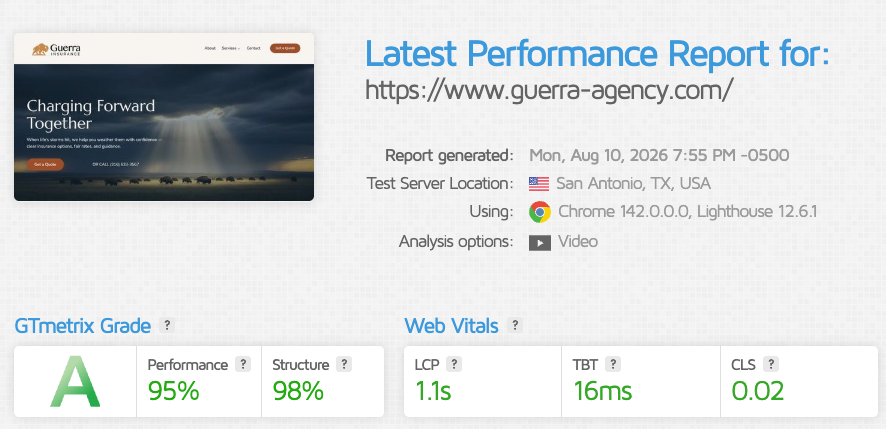
Guerra Insurance Agency, built with Kadence: 95 performance, LCP 1.1s.
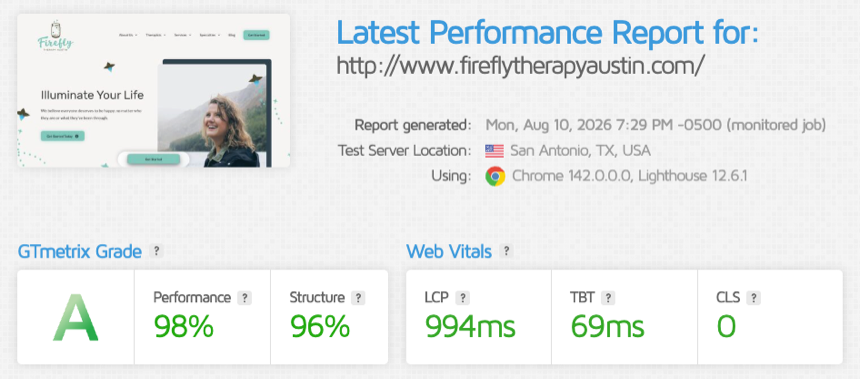
Firefly Therapy Austin, built with GeneratePress and GenerateBlocks: 98 performance, LCP under a second.
Test method: tested August 10, 2026, with GTmetrix from San Antonio using Lighthouse 12.6. Each score reflects the homepage of a production site, one run, and should be read as a point-in-time check rather than a benchmark.
| Site | Stack | Page tested | Grade | Performance | LCP |
|---|---|---|---|---|---|
| Research to Real World | Kadence, WooCommerce, Shop Kit | Homepage | A | 97 | 1.0s |
| Guerra Insurance Agency | Kadence | Homepage | A | 95 | 1.1s |
| Firefly Therapy Austin | GeneratePress, GenerateBlocks | Homepage | A | 98 | 994ms |
Two Kadence builds and one GeneratePress build, all with A grades and LCP at or under 1.1 seconds. If a comparison tells you one of these systems is fast and the other is not, the test was probably a blank demo. On a real site, the weight lives in images, fonts, third-party scripts, and WooCommerce extensions, and both systems stay out of the way when those are handled with care.
Product Stewardship in 2026
This is the section most comparisons skip, and in 2026 it belongs in the decision.
Kadence remains capable software, and both Kadence builds above shipped this year. Liquid Web’s May 2026 consolidation of Kadence accounts and licensing led to publicly documented reports of access and license problems. Our own disruption was limited to several days of confusion locating migrated license information, and we were able to resolve it.
None of that makes Kadence unusable. It does affect how we weigh long-term licensing and product-stewardship risk, particularly for agencies managing many client installations or relying on lifetime licenses.
GeneratePress is founder-led. Tom Usborne remains its creator and lead engineer, which does not guarantee any future pricing or feature decision, but it tells a buyer who is steering. For some of our clients that clarity is worth real weight in the decision.
AI-Assisted Development With Either
AI tools do not make either system the winner, and we say that as a team that uses them daily. We connect Claude Code to WordPress through Novamira on development and staging work, including sites in this post, to inspect templates, trace how a field reaches the front end, and prototype block patterns. The hard part is unchanged. Someone still has to define the content model, review the output, and decide whether the change belongs on the site.
Our experience after months of this work is that AI has been especially useful on GenerateBlocks projects, where a larger share of the work involves query logic, dynamic output, and reusable patterns. Kadence has benefited more in our workflow from AI-assisted documentation, content cleanup, and repeatable editor guidance.
Novamira can expose powerful WordPress capabilities, including files, PHP execution, database queries, and WP-CLI. We use it only in local development or staging, with backups and human review before any production deployment.
Which System for Which Project
Pick Kadence for a content-managed marketing site, a multilingual site with conditional navigation, or a design-led WooCommerce store that a team will maintain without a developer on call.
Pick GeneratePress with GenerateBlocks for a content system: therapist profiles connected to posts, resources connected to products, reusable layouts driven by structured data, and projects a development team expects to keep extending.
We still use both and expect to keep doing so. The choice comes down to the people maintaining the site, the shape of the content, and what the site needs to do after launch. If you are weighing the same choice for a project, our guide to hiring a web designer covers the questions that surface it.
Questions We Hear
Is Kadence still a safe choice after the Liquid Web migration?
Yes, for the software itself. We shipped two Kadence sites in 2026 and continue to see active development. The migration is a product-stewardship signal to consider, especially for agencies managing many sites or lifetime licenses, rather than a reason to rule out Kadence automatically.
Can GenerateBlocks run a WooCommerce store?
Yes, and we would choose it when products connect to a larger content system. For a store that mostly needs strong product page presentation, Kadence with Shop Kit gets there with less custom work.
Is Kadence Shop Kit worth it?
For product page presentation, it was for us. We used it on Research to Real World combined with query loops for dynamic product types. We have not used its checkout or review modules, so we cannot speak to those.
Which is easier for editors after an agency hands off the site?
Kadence, in our experience. More of its controls are discoverable in the editor. A GenerateBlocks site hands off well too, provided the build documented its patterns and the team edits content rather than structure.
Which system is easier to change later?
Both produce WordPress content that can be edited after launch. The question that matters is whether the original build uses reusable patterns, documented custom fields, clear template rules, and a plugin stack small enough for another developer to understand. A well-structured site in either system is easier to maintain than an undocumented site built with the lighter tool.
Which works better with AI tools like Claude Code?
Both work. We connect Claude Code to sites on either stack through Novamira for development and staging tasks. GenerateBlocks development gains more from it because the system’s depth is in queries and composable patterns, which is where an AI assistant saves real time.