Google Ads Management
We manage Google Search, Local Services Ads, Shopping, Performance Max and Ad Grants, and we measure each account by the calls, bookings, purchases or donations it produces. We work on the ad, the landing page and the tracking together, and you decide with us what to fund, fix or stop.
Request an account reviewWhere Google Ads Work Usually Starts
Spending Without a Clear Answer
The account reports conversions, and you can't tell which ones are real business. We check what each conversion action records before judging any campaign.
Leads, but the Wrong Ones
People ask for services you don't offer, call from outside your area, or expect a different price. We read the search terms, ads and landing page against examples from your team.
Someone Already Runs the Account
Your marketer or another agency manages it, and you want a second opinion. We review the account and either advise them or take over, whichever fits.
Accounts We Manage
-
Bodyartforms
SEO, product discovery, Google Ads and Shopping work alongside the in-house team on a custom e-commerce platform.
Read the case study, Bodyartforms -
Firefly Therapy Austin
A new brand, a WordPress site and ongoing search work that help prospective clients find the right service and take the next step.
Read the case study, Firefly Therapy Austin -
American Medical Informatics Association
Google Ads, Ad Grants, technical SEO and cross-domain measurement for a medical informatics association with education, membership, career and policy programs.
Read the case study, American Medical Informatics Association
What We Manage
-
Account Review and Setup
On an existing account we review what affects spend and lead quality: structure, search terms, budgets, settings, ads, landing pages, conversion actions and feeds. On a new one we set up campaigns, tracking and landing pages before spend begins, and revise any old campaigns before importing them.
-
Ongoing Management
Google Ads needs regular decisions. Search behavior shifts, service priorities change, products go out of stock. We review search terms, costs, lead actions, revenue signals and settings, then adjust budgets, targeting, ads, bidding and feeds based on what the account shows. Each report says which campaigns brought in business, what costs too much and what we will change next.
-
Consulting for Your Team
Your marketer or another vendor runs the account, and they need a second opinion, help with a drop in results, or a plan for a test. We advise, and we take on agreed changes when that is faster.
How We Manage Each Campaign Type
Search, Local Services Ads, Shopping, Performance Max and Ad Grants each use different data and have different requirements, so we manage each one differently.
Google Search for Service Businesses
When someone searches for a service you provide, the ad and the landing page should answer that specific need. We build and manage search campaigns around the work you want to win, from therapy and healthcare to home services, legal services and professional firms.
See the full checklist
- Search-term and keyword management
- Campaign and ad group structure
- Ad copy and asset testing
- Service-specific landing pages
- Call, form, appointment and quote tracking
- Negative-keyword management
Google Local Services Ads
Local Services Ads deliver direct leads, including phone calls, to businesses Google has verified. Eligible categories change by location and by policy, so the first question is whether yours qualifies where you work. We run the program alongside Search and fund whichever source produces the right kind of inquiry.
See the full checklist
- Category and service-area setup
- Verification, budget and pacing
- Review requests for the Local Services profile
- Lead review and dispute handling
- Comparison against Search campaigns, by inquiry quality
Shopping and Performance Max for E-Commerce
For an online store, the feed, the product data, the product pages and the purchase tracking matter as much as the campaign settings. Performance Max can extend a campaign across Google inventory, but it relies on strong product data, useful creative and reliable conversion signals. We give each Performance Max campaign a defined goal and measure it against that goal.
See the full checklist
- Merchant Center and product-feed review
- Product title, category and attribute improvements
- Product and category performance analysis
- Purchase and revenue tracking
- Budget, bidding and profitability review
Google Ad Grants for Nonprofits
A Google Ad Grant can help an eligible nonprofit reach people looking for its programs, services, resources, events or ways to get involved. It also needs ongoing management. Google's Ad Grants policies require a 5% monthly click-through rate and at least one meaningful conversion each month. Two consecutive months below the click-through threshold can lead to temporary deactivation.
See the full checklist
- Grant account setup or recovery
- Campaign structure around programs and audiences
- Landing-page recommendations
- Click-through rate and policy compliance monitoring
- Meaningful conversion tracking and monthly review
How We Manage a Google Ads Account
-
Define the Action That Matters
Before changing campaigns, we agree on what a valuable action looks like for your organization. It may be a completed quote form, a booked consultation, a purchase, a registration, a donation, or a qualified lead recorded in your CRM.
-
Match the Campaign to the Need
We choose the campaign type, targeting, budget and landing page based on the job it has to do. A search campaign for a bathroom remodel, a Shopping campaign for an online catalog and an Ad Grant campaign for an education program should not be managed the same way.
-
Check the Whole Path
We review the search term, the ad, the landing page, the form, the phone path and the tracking together. If people click but do not take the next step, check the targeting, the message, the page, the offer and the measurement before changing the bid.
-
Review, Explain and Improve
We review performance regularly, explain what the data shows in plain language, and make a documented plan for the next round of changes. You should know what is being changed, why, and what we are watching afterward. We also ask your team which inquiries were a good fit, because the account can't see what happens after a form is sent.
What an Account Review Covers
What We Look At
- Campaign and account structure
- Search terms and negative keywords
- Budget allocation and spend patterns
- Conversion tracking and GA4 setup
- Landing-page match
- Product feed health for e-commerce
- Ad Grants requirements for nonprofit accounts
- Next steps, prioritized by likely impact
What We Usually Ask For
- Read-only access to Google Ads, GA4, Merchant Center or Search Console
- The services, products, programs or audiences that matter most
- Any lead, sale or revenue information you can share
- Access to the pages, feed, scheduling tool, CRM or checkout involved
- A point of contact who can answer business and sales questions
If tracking is incomplete, that is fine. Finding and fixing that gap is often part of the first phase.
Why Garrett Digital
Ads, Pages and Tracking Together
We work on the ad, the landing page and the tracking together. When an ad needs a better destination, we improve the page. When reporting drifts, we fix the tracking. We adjust the account based on what happens after the click, alongside our website and analytics work.
Direct, Experienced Work
You work directly with the people managing your account. Garrett spent 16 years leading SEO and user experience at the American Academy of Family Physicians, which helps when the problem is in the page, checkout, quote flow, tracking or content behind the campaign.
Reporting That Supports Decisions
You should be able to answer basic questions without deciphering a dashboard. Which campaigns bring inquiries? Which products sell? Which searches waste budget? What should change next? We organize reporting around those decisions.
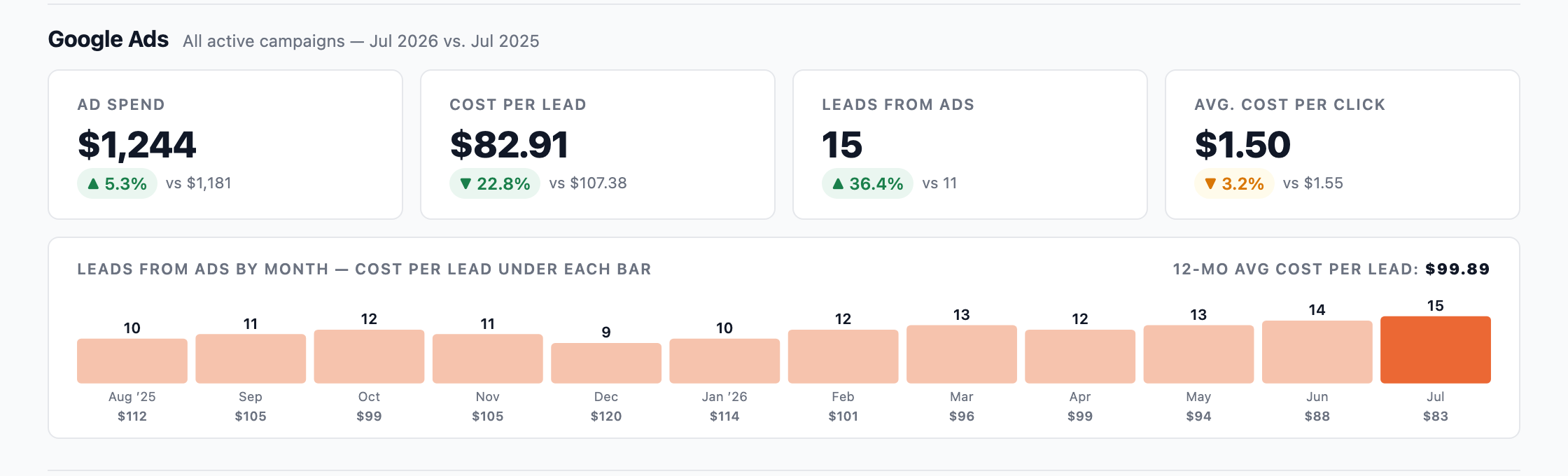
Example: Google Ads in the Monthly Report
Google Partner
Garrett Digital is a current Google Partner. We maintain the required certifications and manage eligible client accounts through the Google Partners program.
Questions About Google Ads Management
Yes. A review answers the questions you bring, such as where the budget goes or why the leads are poor, and ends with a ranked list of changes. Your team can make them, or we can scope ongoing work.
Usually, with your help. We check the search terms, targeting, ads and landing page, and we ask your team for examples: the wrong service, the wrong area or the wrong price expectation. Some fixes are in the account. Others are on the website or in how inquiries are handled.
It depends on your market, what a customer is worth and how much you can commit to testing. We recommend a starting budget after seeing the account or the market. If the budget and the expectations don't fit, we say so before you sign. Google bills your ad spend directly to your card, separately from our fee.
Yes, either way. We check whether the page matches the ad and makes the next step clear. We can build the changes on a staging copy for review, write specifications for your developer, or explain the problem and review what they build. Whether page work is included is set in the scope.
No. Results also depend on your offer, pricing, availability and how quickly inquiries get a reply. We commit to the agreed work, a reason for every change and plain reporting on what happened.
New ads usually start running within hours, once Google approves them, and a tracking fix shows up in reports within a day. Bidding and budget changes take longer, because Google's bid strategies go through a learning period as conversions come in. An account with a dozen or more conversions a week usually shows a clear pattern within a few weeks. One with a few conversions a month takes longer.
Need a Clearer View of What Google Ads Is Producing?
Tell us what you want from Google Ads: more quote requests, better leads, more online sales or a compliant Ad Grant account.