GA4 and Google Tag Manager Consulting
We set up, audit and fix GA4, Google Tag Manager and conversion tracking, so you can trust the numbers enough to act on them.
That means knowing which channels, pages and campaigns lead to a quote request, a booked appointment or a purchase, and why Google Ads and GA4 report different totals.
Talk about your analyticsCommon Measurement Problems
Reports That Disagree
Google Ads shows one number, GA4 another, and neither matches what your team sees. We check the definitions and settings behind each report before calling anything broken.
Key Actions Nobody Can See
You want to know whether visitors send an inquiry, book or buy. We check which of those the site and its tools can record reliably, and say where the gaps are.
An Inherited Setup
Tracking added over the years through plugins, theme code, Tag Manager and past vendors. We map what is there, remove duplicates and leave a setup your team can follow.
Data Without a Recommendation
A dashboard shows that something changed. We connect the change to a decision: fix a page, look closer at a channel, change the ads, or wait for more data.
Decide Which Actions to Count
What Counts as a Key Event
GA4 calls a meaningful marked action a key event: a completed quote request, a purchase, a registration, a donation or an application. A page view, a phone-number tap or a download can be useful context without being a completed business outcome, and the reporting should say which is which.
What We Do
-
GA4 Setup, Audit and Improvement
Google Analytics 4 can collect a great deal of activity that does not answer the questions a business has. We review the existing setup, identify missing or misleading tracking, and configure GA4 around the pages, events and key actions that matter to your organization.
See the full checklist
- Key events for completed forms, appointments, registrations, donations, purchases and applications
- Events for the steps before a conversion: selecting a service, starting a quote, viewing a product, adding to a cart, beginning checkout
- Channel and campaign attribution
- Custom dimensions and audiences when they support a specific reporting or advertising decision
-
Google Tag Manager
Tag Manager gives teams one place to manage web tags and tracking rules. We build containers your team can understand and maintain, with clear naming, versions, testing and documentation. When the site changes, your team can see what needs updating, and important tracking is less likely to stop without anyone noticing.
See the full checklist
- GA4 configuration and event tags
- Form, call, booking, purchase, video, download and engagement tracking
- Data-layer planning for e-commerce and custom applications
- Google Ads conversion tracking, plus CRM, scheduling and marketing-platform integrations
- Consent and privacy-related tag configuration where it is needed
-
Conversion and Lead Tracking
Traffic gives context. We help define and track the actions that show someone is moving closer to becoming a customer, member, patient, donor, applicant or client. A click on a booking button is not a booking. Where the booking tool allows it, we track the completed appointment. Where it does not, the report says so. For a service business, that may mean separating completed quote forms from phone-number taps. For an online store, recording product views, add-to-cart activity, checkout starts, purchases and refunds. For a membership organization, tracking event registration, application completion, or a handoff to a separate member platform.
-
Cross-Domain and Multi-Platform Analytics
Many organizations do not have one website. A visitor may begin on your site and finish a booking, an application or a purchase on another domain entirely. Cross-domain measurement links activity across related sites into one visit. We configure and test those handoffs so one person is not counted as several unrelated visitors.
See the full checklist
- A public website that sends visitors to a scheduling tool
- A nonprofit or association website connected to a registration system
- A storefront with a separate checkout or account system
- A custom application that needs product and marketing data measured together
-
Call Intent, Calls and Qualified Leads
A tap on a phone number is call intent. A connected call is a call. A lead your sales team confirms against its own criteria is a qualified lead. We report the three separately so each count means what it says.
Analytics by Type of Organization
Practices and Service Businesses
For teams that need to know which sources bring inquiries, calls, consultations and appointments.
- Which campaigns are bringing in quote requests?
- Which service pages lead to contact?
- Are paid-search visitors taking the next step?
- Where are people leaving before they reach the inquiry?
- Are inquiries arriving through the booking tool being counted?
E-Commerce Businesses
For stores that need to understand product discovery, cart behavior, checkout, purchases, revenue and the marketing sources behind those sales.
- Which products and categories bring in revenue?
- Which campaigns lead to purchases, and which stop at product views?
- Where are shoppers leaving the checkout process?
- How do organic search, paid search, email and referrals compare against revenue?
Organizations With More Than One Platform
For associations, nonprofits and product teams whose visitors move from a public site into registration, membership, donation, learning or application platforms. We measure across those handoffs so one visit isn't counted as several.
The AMIA case study covers cross-domain measurement for an association's education, membership and career programs.
Reporting That Helps You Decide What to Do
We build recurring reports around the decisions you need to make: where to invest, what to improve, what to stop funding, and where people are getting stuck.
Looker Studio and GA4 Reports
Recurring reports built around the measures your team acts on, showing what is producing activity, where people are dropping off, and what to look at next.
See the full checklist
- Looker Studio reports with the measures your team acts on
- GA4 exploration reports and path analysis
- Scheduled automated delivery
Cross-Channel Reports
We pull data from the GA4, Search Console and Google Ads APIs with Python and combine it in one report. The report compares each channel against the same key actions.
See the full checklist
- Revenue, orders and key events from GA4
- Organic clicks, impressions and average position from Search Console
- Google Ads spend, conversions and return alongside organic
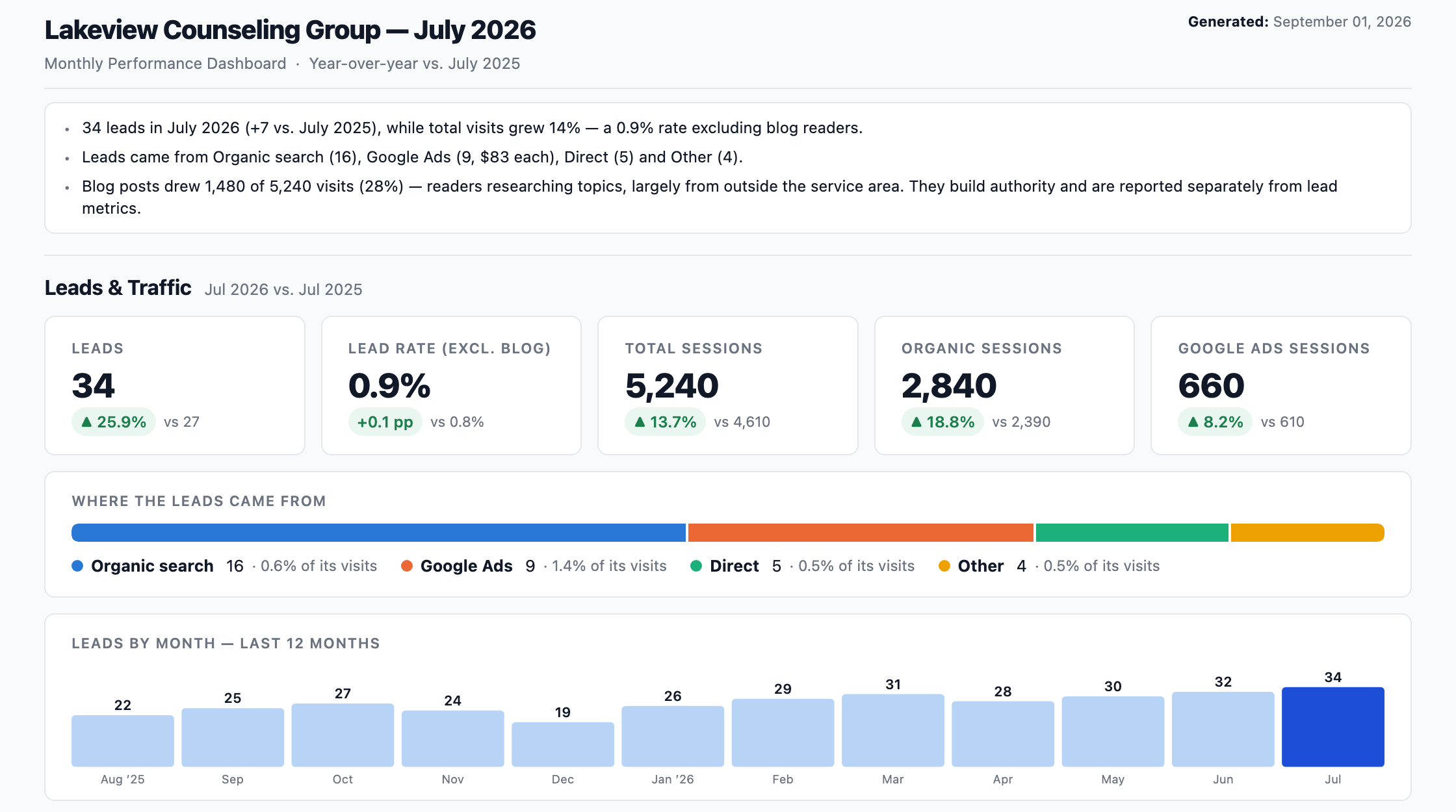
The report shows what each source contributes, so the next decision has better context. Every metric is defined in Understanding Your Monthly Marketing Report.
What Analytics Can Show and What It Cannot
Analytics records what visitors did on your site. It cannot tell you on its own whether an inquiry was a good fit or a sale was profitable. For that, we add your sales records or your team's feedback.
| We can show | Analytics cannot show on its own |
|---|---|
| Which channels, pages and campaigns led to key events | Whether an inquiry was someone you could help |
| Where visitors leave a form or checkout | Profit, margin or refunds unless they are sent to GA4 |
| Completed purchases and their revenue | Calls that never touched the website |
| Which tracking changed, and when | Activity that a visitor's consent choices or browser blocked |
How We Set Up Analytics
-
Define What Counts
We start with the question your organization needs answered. For example: which source brings completed inquiries, where customers leave checkout, whether visitors reach the registration system, or whether people finish the main task in an application.
-
Audit the Current Setup
We review GA4, Tag Manager, existing events, conversion actions, integrations and reports, along with the site or application and the pages where key actions happen. Then we list what is missing, duplicated, misleading or broken.
-
Build and Test the Measurement
We configure tags, events, key events, data layers, cross-domain settings and reports. Then we test the path from a real visitor action through to the relevant analytics and advertising platform, before anyone relies on it for a decision.
-
Review and Improve Over Time
Tracking needs attention after launch. Sites change, forms are replaced, checkouts move, campaigns change, and new features introduce new actions to measure. We provide ongoing analytics consulting, reporting and maintenance when the work needs to continue.
Measurement We Built
All work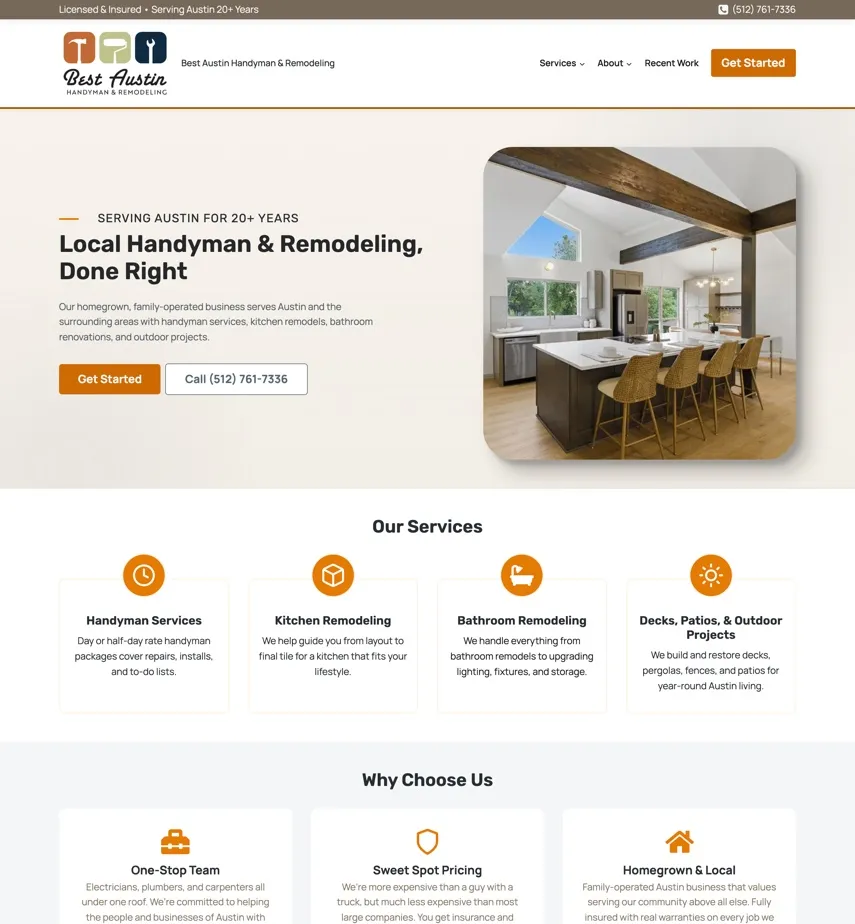
Best Austin Handyman & Remodeling
A WordPress rebuild, Google Ads and Local Services Ads, local SEO, and website and Angi leads sent to JobTread with their source attached, for a family-run remodeling company.
+55%
-
A new brand, a WordPress site and ongoing search work that help prospective clients find the right service and take the next step.
+80%
Why Garrett Digital
Connected to the Marketing Work
We also manage SEO, Google Ads, landing pages and websites, so we can act on what the analytics shows. If tracking shows a campaign has the wrong landing page, a form has stopped working, or a service page is not answering the search, we can fix the source of the problem.
Analytics Is Part of the Build
We plan measurement while we design and build websites and applications. Key pages, forms, product paths, workflows and integrations can be measured from launch day.
Direct, Experienced Support
You work directly with the people setting up and reviewing the analytics. Garrett spent 16 years leading SEO and user experience at the American Academy of Family Physicians. That helps when an analytics problem turns out to be a page, checkout or integration problem.
Questions About GA4 and Tag Manager
Usually not. We review what is installed and test the actions that matter. Then we fix a few tags, document what works or simplify a setup that has grown complicated. You get a list of what is working and what needs attention before anything changes.
They often count differently. Google Ads' standard conversion columns credit a conversion to the date of the ad click, while GA4 reports the event on the day it happened. The two can also use different attribution settings and count different actions. We compare the settings before assuming the tracking is broken.
Partly. GA4 shows which channels led to key events such as a form or a purchase. Whether that inquiry became a customer, or the sale was profitable, is recorded in your CRM, your sales records or your team's notes. We connect what can be connected and show where the website data stops.
Usually, depending on what the form tool or booking platform allows. A click that sends someone to the booking site is not a completed booking, and we report the two separately.
GA4 collects and reports what visitors do. Tag Manager is where you manage the tags that send that information to GA4, Google Ads and other tools. Installing Tag Manager on its own measures nothing.
Yes. Two tags firing for one form, a confirmation page that reloads, or the same action imported into Google Ads twice are common causes. For purchases, sending a transaction ID lets GA4 drop duplicates of the same order.
Yes, with care about what gets sent. Before configuring anything, we list the pages, events and form fields involved and keep health details out of what analytics collects. Google's own guidance restricts using Google Analytics with protected health information, so your privacy or legal adviser should review the plan. Our setup does not replace that review.
No. GA4 can run on the Google tag placed directly in the site, or through Tag Manager. Tag Manager is usually easier to maintain once several tools or custom events are involved, so we recommend one after seeing the site and who will maintain it.
If you want one. Larger organizations often ask for a written list of every tracked action, and many arrive knowing what they want measured. We can help your team work through those decisions, then build and test the tracking to match.
Need to Know What Your Website and Marketing Are Producing?
Tell us which numbers you're questioning and which actions matter, and we'll tell you what we can check and what access we'd need.